LittleJS
 LittleJS - The Tiny JavaScript Game Engine That Can





🚂 All aboard!
LittleJS is a lightweight open source HTML5 game engine for modern web development. It’s small footprint is packed with a comprehensive feature set including hybrid rendering, physics, particles, sound effects, music, and input handling. The code is very clean and well documented with some fun examples to get you started. Choo-Choo! 🚂
🚀 Join the First Ever LittleJS Game Jam
The LittleJS Game Jam will take place From Nov 11 to Dec 12! Unleash your creativity and develop amazing games using the LittleJS game engine. 🕹️🎮 Sign up today and get more info about the jam on itch.io!
About LittleJS
LittleJS is a small but powerful game engine with many features and no dependencies.
✨ Graphics
- Super fast sprite and tile map rendering engine with WebGL
- Update and render over 10,000 objects at a solid 60fps
- Apply Shadertoy compatible shaders for post-processing effects
- Robust particle effect system and effect design tool
🔊 Audio
- Positional sound effects with wave files or ZzFX
- Use ZzFX sound effect generator to play sounds without asset files
- Music with mp3, ogg, wave, or ZzFXM
🎮 Input
- Comprehensive input handling for keyboard, mouse, gamepad, and touch
- On screen touch gamepad designed for mobile devices
💥 Physics
- Robust 2D physics engine with collision handling for axis aligned boxes
- Very fast collision and raycasting for tile maps
🚀 Flexibility
- Compatible with all modern web browsers and on mobile devices
- Support for TypeScript and Modules with example projects for both
- Ideal for size coding competitions like js13kGames, starter project builds to a 7KB zip
- Builds to an executable with Electron for distribution on Windows, macOS, and Linux
- Open Source with the MIT license so it can be used for anything you want forever
🛠️ And more…
- Node.js build system
- 2D vector math library
- Debug primitive rendering system
- Particle effects system and design tool
- Bitmap font rendering and includes a built in engine font
- Medal system tracks and displays achievements with Newgrounds integration
Demos
These examples are for both learning and using as starter projects to create your own games.
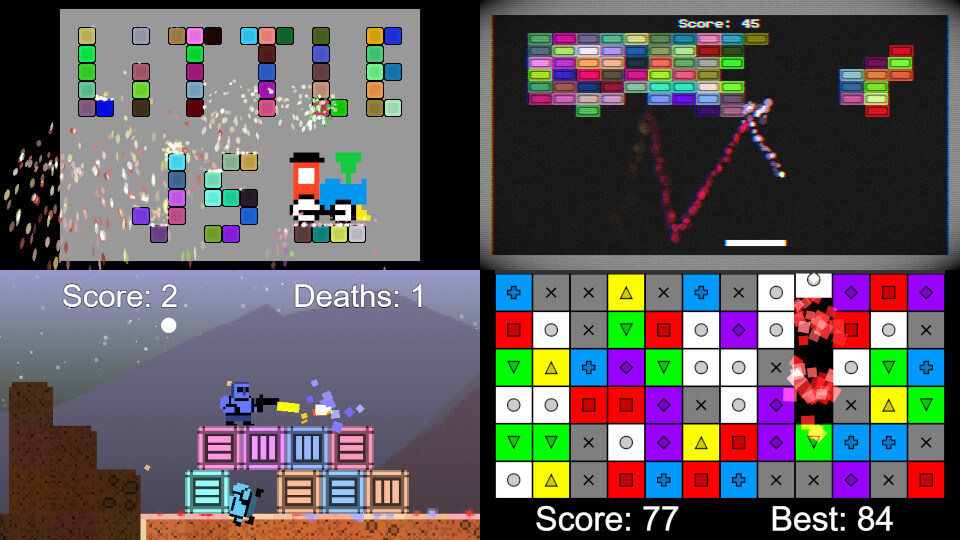
Starter Project - Clean example with only a few things to get you started
Breakout - Block breaking game with post-processing effects
Puzzle Game - Match 3 puzzle game with HD rendering and high score tracking
Platformer - Platformer/shooter with procedural generation and destruction
Stress Test - Max sprite/object test and music system demo
Particle System Designer - Particle system editor and visualizer
How to use LittleJS
To get started download the latest LittleJS package from GitHub or install via npm: npm install littlejsengine.
The Breakout Tutorial demonstrates how to make a simple game from scratch. The tutorial is also available on YouTube.
This GitNation talk explains how LittleJS works with some tips on how to use it.
Join our vibrant community on Discord to get help, share your projects, and collaborate with others.
Builds
To easily include LittleJS in your game, you can use one of the pre-built js files.
- littlejs.js - The full game engine with debug mode available
- littlejs.release.js - The engine optimized for release builds
- littlejs.min.js - The engine in release mode and minified
- littlejs.esm.js - The engine exported as a module with debug mode available
- littlejs.esm.min.js - The engine exported as a minified module in release mode
To rebuild the engine you must first run npm install to setup the necessary npm dependencies. Then call npm run build to build the engine.
The starter example project includes a node js file build.js that compresses everything into a tiny zip file using Google Closure, UglifyJS, and ECT Zip.
LittleJS Setup
To start LittleJS, you need to create these 5 functions and pass them to engineInit.
function gameInit()
{
    // called once after the engine starts up
    // setup the game
}

function gameUpdate()
{
    // called every frame at 60 frames per second
    // handle input and update the game state
}

function gameUpdatePost()
{
    // called after physics and objects are updated
    // setup camera and prepare for render
}

function gameRender()
{
    // called before objects are rendered
    // draw any background effects that appear behind objects
}

function gameRenderPost()
{
    // called after objects are rendered
    // draw effects or hud that appear above all objects
}

// Startup LittleJS Engine
engineInit(gameInit, gameUpdate, gameUpdatePost, gameRender, gameRenderPost);
LittleJS Objects
LittleJS can be used as an object oriented system by extending the base class EngineObject with your own. This lightweight class provides many useful features including physics, collision, parent/child system, and sorted rendering. These objects are added to the global list of objects where they will automatically be updated and rendered until destroyed.
Here is a template you can use to make objects that behave however you want. See the examples for a complete demonstration.
class MyObject extends EngineObject
{
    constructor(pos, size, tileInfo, angle)
    {
        super(pos, size, tileInfo, angle);
        // setup object
    }

    update()
    {
        // update object physics and position
        super.update();
    }

    render()
    {
        // draw object as a sprite
        super.render();
    }
}
Debugging
Debug builds of LittleJS have a special menu that can be opened by pressing the Esc key.
- Esc: Debug Overlay
- 1: Debug Physics
- 2: Debug Particles
- 3: Debug Gamepads
- 4: Debug Raycasts
- 5: Save Screenshot
Games Made With LittleJS
Here are a few of the amazing games people are making with LittleJS…
- Space Huggers - Run and gun platformer with procedural levels
- Undergrowth - An interactive music videogame for the band Squid
- Space Huggers - JS13K Edition - Original js13k game with source code
- Isletopia - Relaxing strategy game of greenifying barren islands
- Dead Again - Top down survial horror by sanojian & repsej
- Hel’s Trial - Turn based RPG by Sebastian Dorn
- Bit Butcher - Survival crafting game by Deathray Games
- Necrotic Commander - Tower defense game by Daniel Jeffery
- Boxing up Bamboo - A challenging puzzle game by Patrick Traynor
- Samurai Sam - A Fruit Ninja inspired game by John Edvard